






Quick note: do you want the templates Marie mentions in this post? You can find them here.
Marie Poulin’s Notion is a mirror.
Drop into any piece of her system, and you can see her life reflected as a series of linked database entries. She has a Daily Journal which links to her Quarterly Goals. She has a Quarterly Goals database which links to her Yearly Vision. She has a Yearly Vision which links to notes on books she’s read and projects she’s completed.
She weaves and knots these elements together to create one of the most complex, and compelling systems I’ve ever seen. Each page pulls and remixes data from every other part of her system, to show her everything she needs when and how she needs it.
As each aspect of her life changes and evolves her Notion shapeshifts to display it.
If it seems like she organizes her Notion like it’s her job, that’s because it is.
For over a decade she’s been helping business owners launch digital products and get organized to reach their goals. And, most recently, she’s been doing it all using Notion — becoming an official Notion Pro and teaching workshops and courses to help her students get the most out of the tool.
“I just think it has improved my life in so many ways,” she says. And you can count them: she tracks everything from her todos, to her goals for the week, quarter, and year, to her workouts, to her meals, to notes on every class she’s ever taken.
Most impressive of all, is that she never gets tired of it either. “I get pure joy from doing it all the time. Notion is the only thing that’s worked, because I feel like I’ve made it fun.”
If you ever wondered how to keep your entire life organized inside of Notion then this is the interview for you. Let’s get started.
She always starts her day off by looking at Marie HQ
I have a Personal Dashboard page that I look at every morning. I call it Marie HQ.
It has a bunch of components including:
- My journal for the day
- My weekly agenda
- A list of my quarterly goals
- A list of my most important upcoming tasks
- Links to my active personal and client projects
- Personal resources like my notes, reading, and courses I’m taking

She journals every day
One thing I interact with every day inside of my Marie HQ is my journal. I track everything in there including my effectiveness, my energy, my happiness, my exercise, my reading, and more. It’s a lot.
My Marie HQ page is set up to only show me the three most important parts of my journal each day:
- My highlight of the day
- A planned physical activity
- An area of study
These are things I actually pre-populate every Sunday for the week ahead. Then I’ll continue to fill out the rest of the journal as I get into my day.
Her Journal view helps her track every aspect of her life
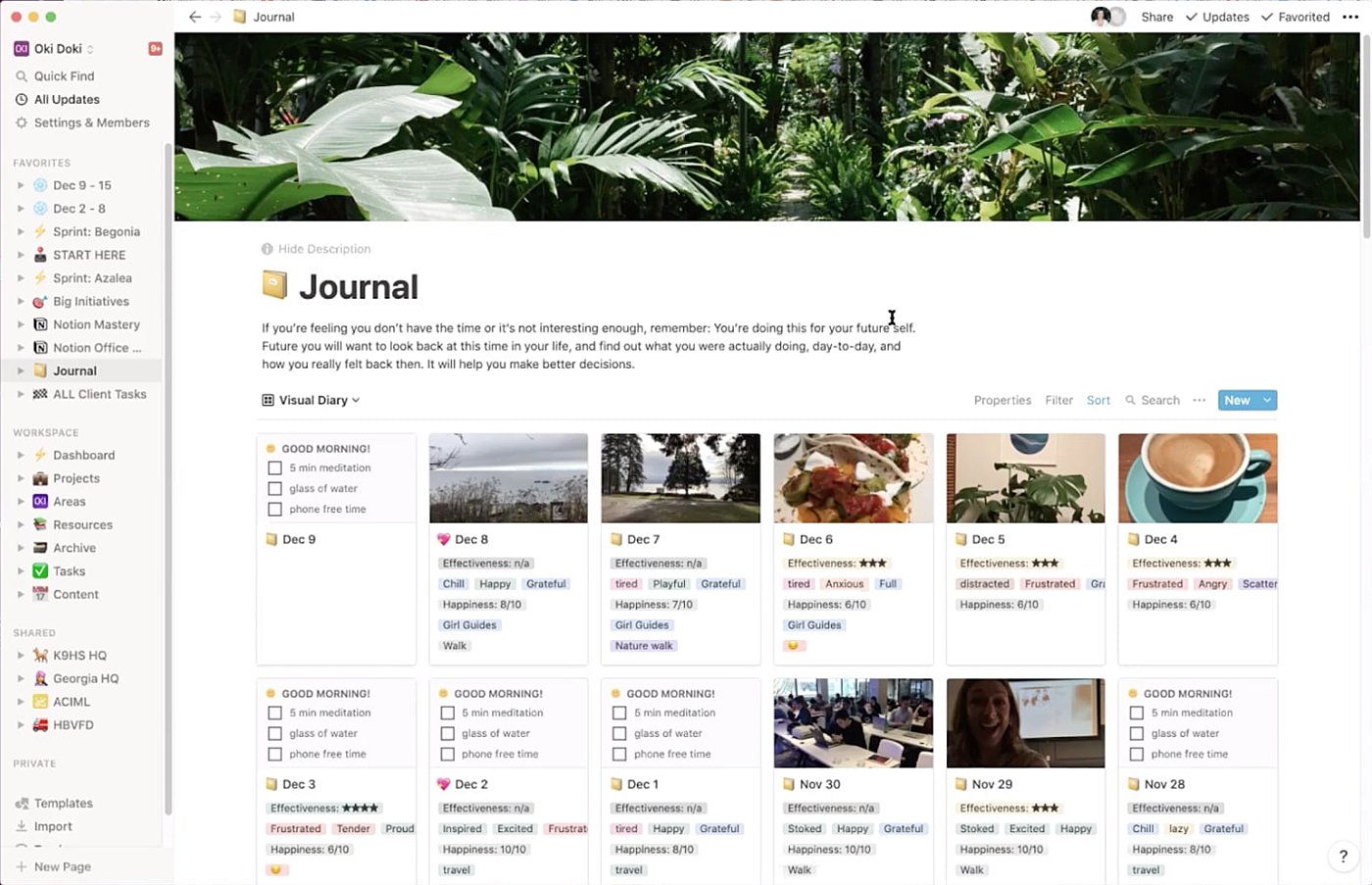
If I leave my Marie HQ page, and click in to my Journal itself, it shows me a really good overview of how I’ve been spending my days for the last week or two. You’ll notice that it has a lot more details than the Marie HQ page does:
If I click into any given entry, you can see how many things I track on a given day:
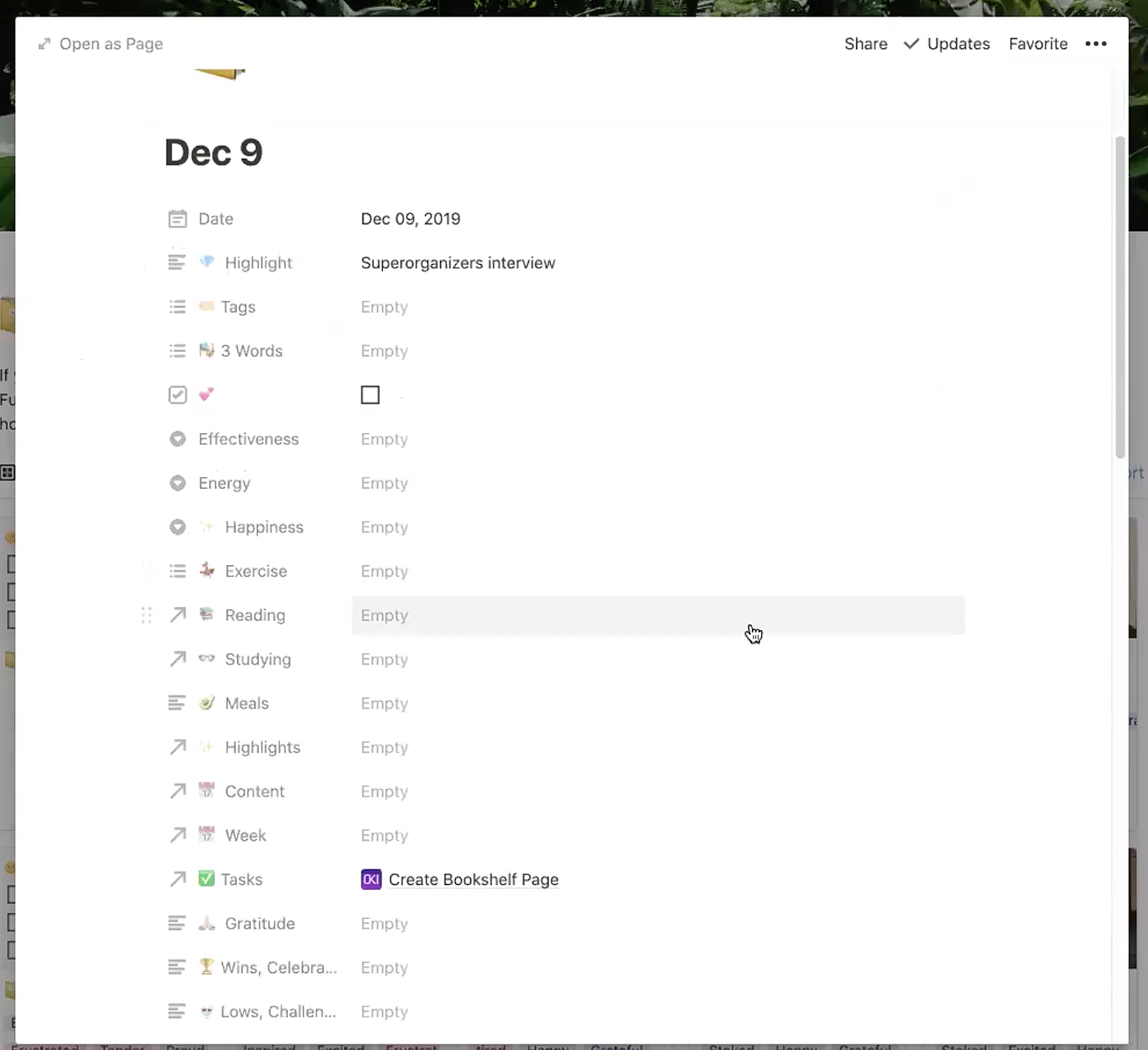
Every day I’m marking down everything from my effectiveness, to my energy, to my happiness, to what I read, and what I eat.
I also created a view of my Journal that lets me see my days sorted by my emotions.
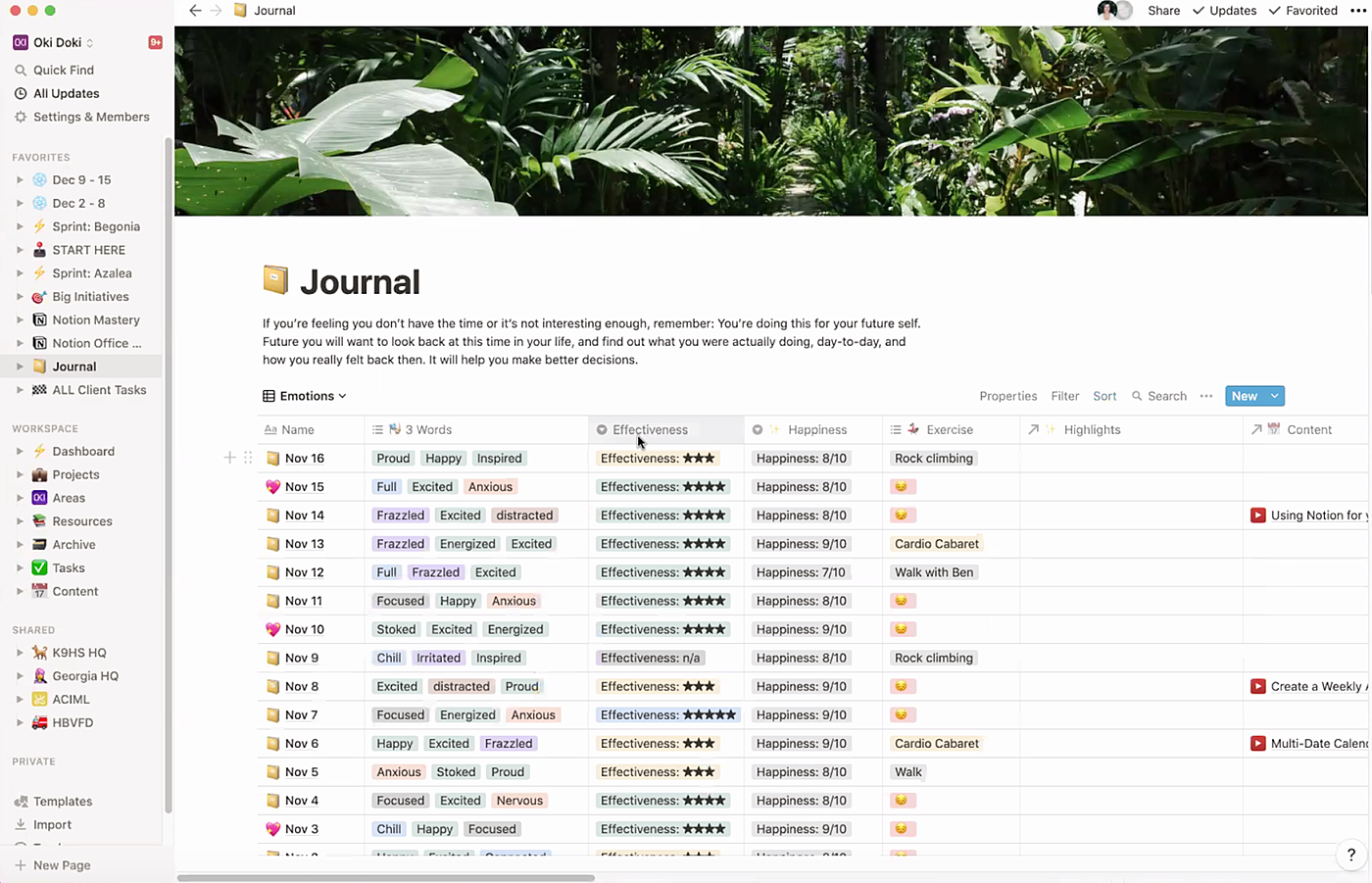
This view is super helpful because I can find out what works well for me and what doesn’t.
For example, in the beginning of the year I kept seeing “overcommitted” and “tired” come up a lot. Just by glancing at this view, I could see something was wrong. The words were telling me I was fried — crispy.
I realized that I was overcommitting to my clients and that was causing me to burn out.
Once I realized that, I ended up letting two clients go. That was really hard, but very necessary. When I did that, things instantly improved.
My journaling in Notion helped me realize it and take action on it.
She spends most of her time in her weekly agenda
I probably spend the most amount of time in my weekly agenda.
Each week gets an entry, and each entry lets me track a bunch of important things like: my project focus for the week, my most important tasks, and the goals I’m currently working towards.
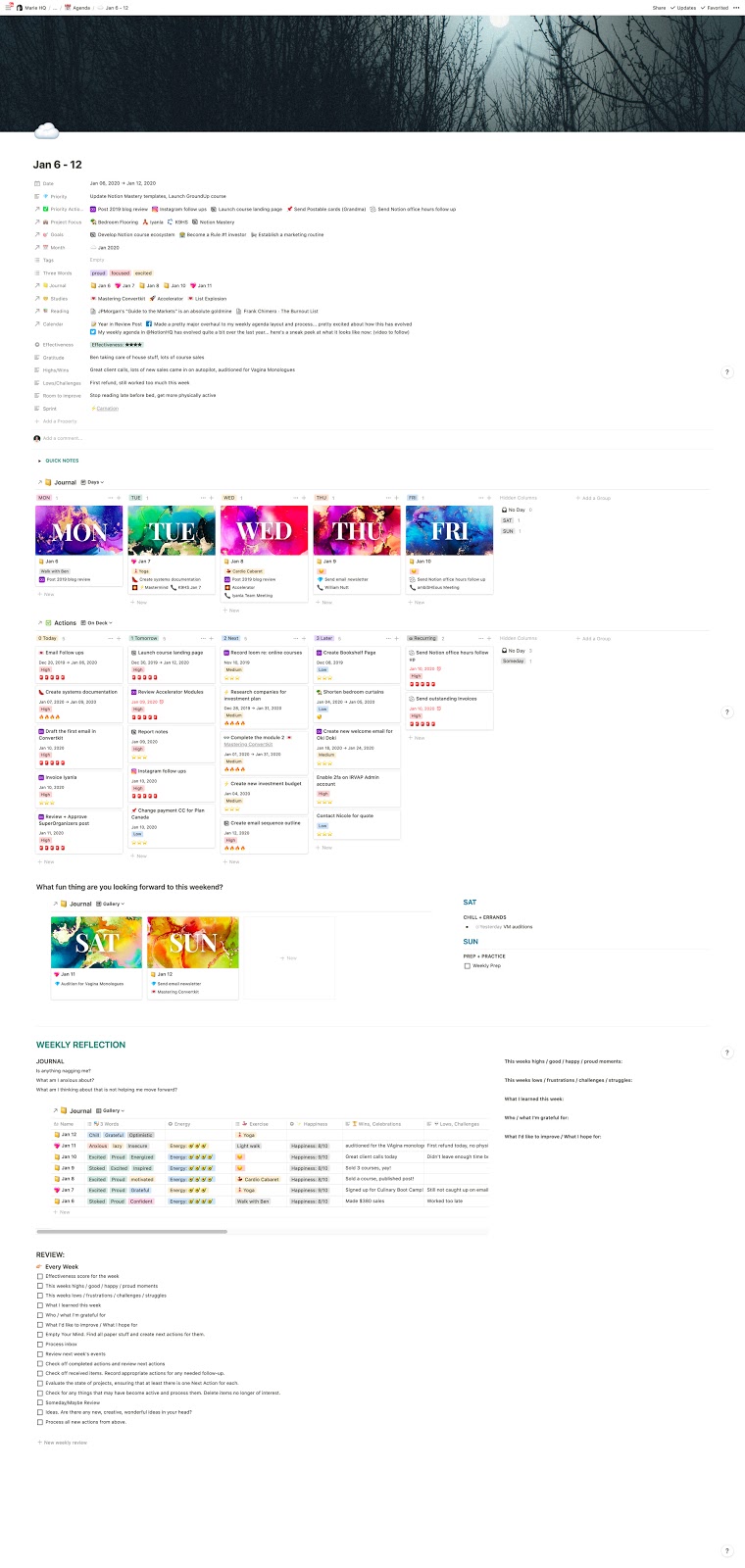
You’ll see that just like my Marie HQ page, my weekly agenda also has an embedded view of my Journal database, filtered to show only the entries for the current week.
I then also embed my main task database inside of it, and this is where I spend most of my time managing my tasks and commitments.
I find that doing this helps me stay out of autopilot mode, and gets me reflecting on what needs to change, or how I can do better. This helps me move from reactive to proactive, and keeps my intentions top of mind.
Her Notion remixes the same elements over and over again into different views
One great thing about Notion is that it lets me see any given piece of my system in a bunch of different places.
For example, I can access my Journal from inside of my Marie HQ. But it actually has its own home elsewhere in my system.
I link to it from my Marie HQ page just because it makes it easier for me to access it, rather than hunting around to find where it lives. Notion makes it really easy to link from one page to another so you can put what you need, where you need it.
That means you don’t have to do any of the digging that you’d do in Evernote or Asana where these types of things tend to get lost.
Notion helps her see all of her commitments so nothing gets buried
The biggest issue I’ve had with task management software in the past is being able to see ALL of the things I’m responsible for without anything getting buried. I think we often overcommit because we actually forget what we’ve committed to and what we’ve committed to isn’t always visible.
There are often many moving pieces that we think we’ll remember, and we don’t write them down anywhere. With my setup, I am tricking my brain into seeing those commitments over and over again, no matter what view I’m looking at.
My commitments are basically always staring me in the face. I embed them over and over inside different pages, with filtered views depending on their context. I’ve never been able to get close to this level of follow-through in the past with other tools. I just love the flexibility and ability to really adapt it to your working style.
How she manages tasks
I share a Notion workspace with my husband, so we have a shared Team Dashboard. Everything we need to reference between the two of us can be found on this dashboard both for our business and our household. We’ve built it as an adaptation of Tiago Forte’s Areas.
We also have a master task database between the two of us that we call Actions.
My personal philosophy is that a complete stranger should be able to be dropped into our workspace and pretty quickly be able to figure out what we do, why, and how.
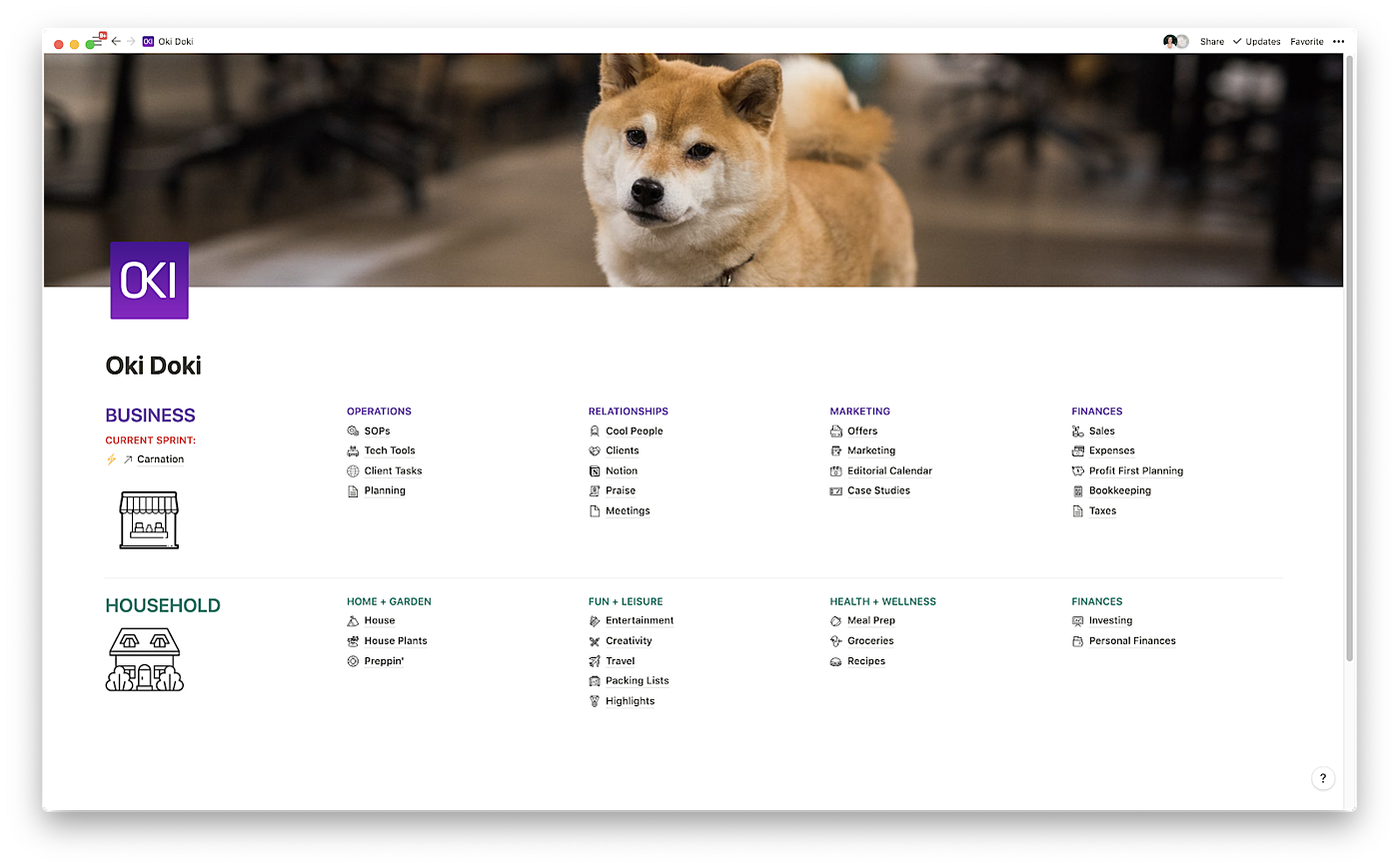
We have a shared Projects database for client projects, as well as internal business projects, personal projects, and house projects.
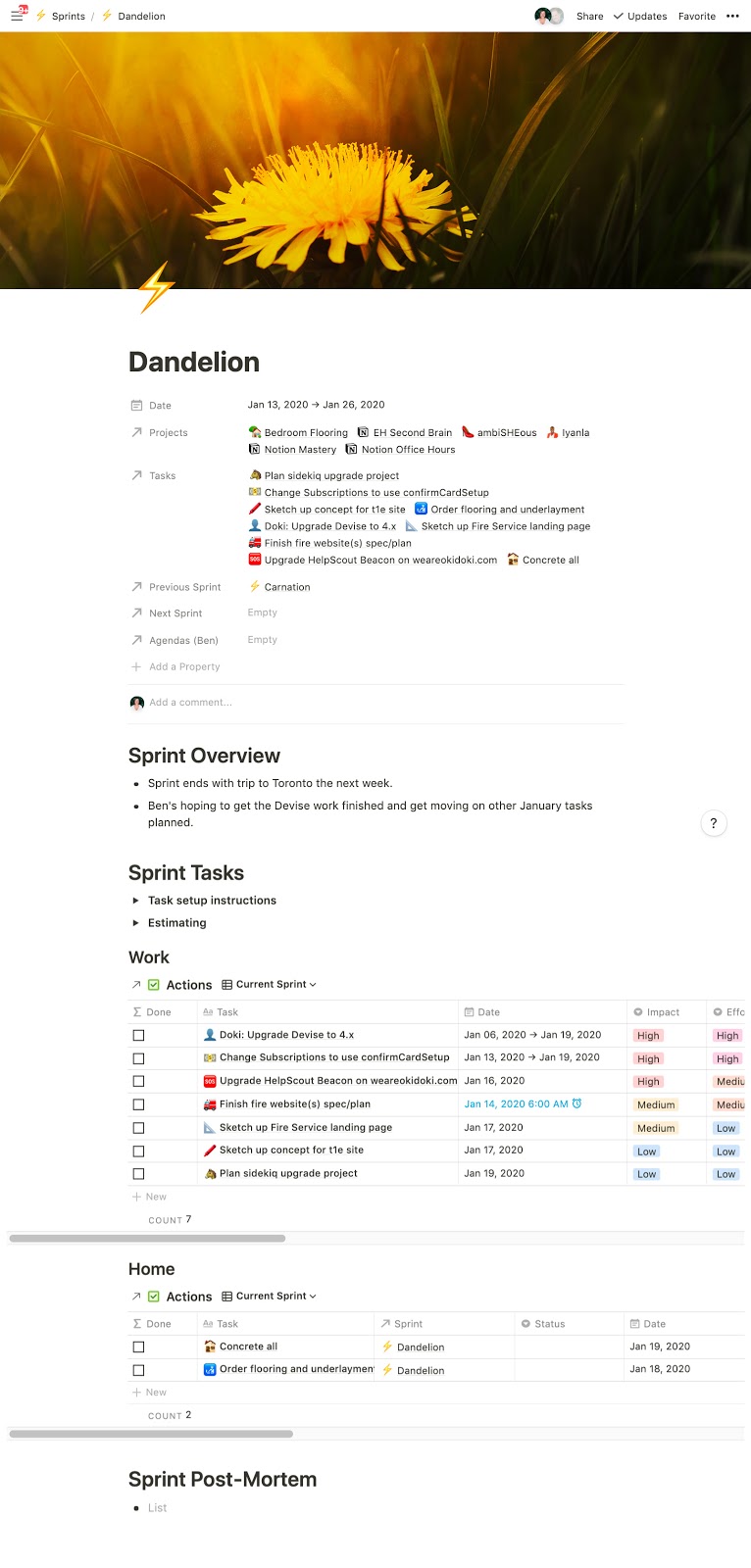
We also recently added Sprints to our workflow to help us create momentum and accountability, which is basically a database that groups todo items from Actions together into a two week timeframe.
As part of our process every 2 weeks we share what we’re working on, what we’re committed to, and our general intentions for the coming weeks. This helps us keep one another in check and make sure that we’re not overcommitting or getting distracted with work that is low impact.
We do a light brainstorm and make notes based on the last sprint, and then we each translate our ideas into next actions. We also look at our backlog of tasks that haven’t been done, and we ask ourselves if these actions are still a priority, and add any new ones as they come up.
We also use the sprint planning as a chance to plan small maintenance projects around the house.
We worked out some fancy formulas to help us prioritize and sort our tasks visually based on their effort and impact ratio:
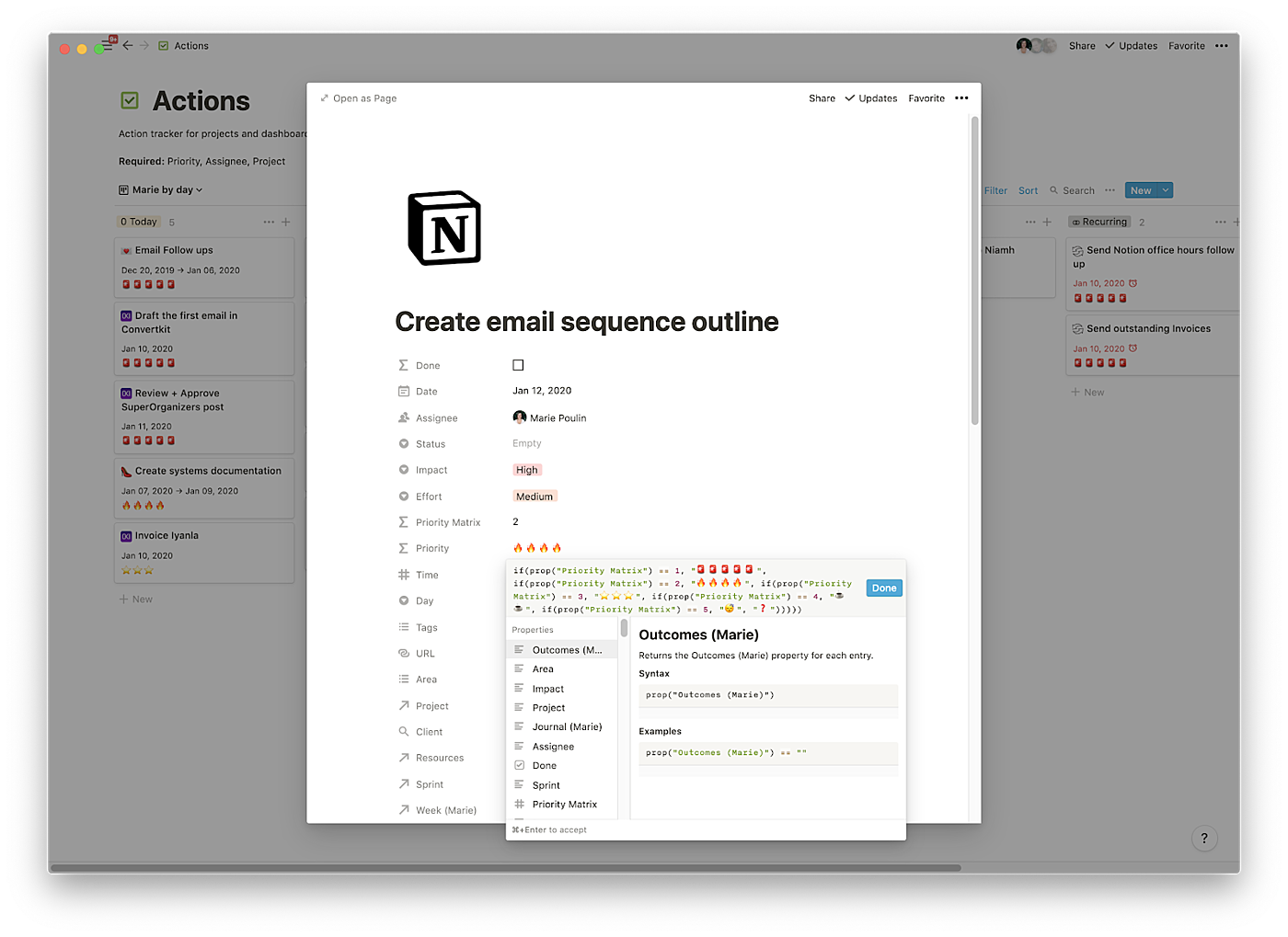
All of my tasks are of course embedded in my Agenda, Planning page, and MarieHQ, so there’s just no way to miss them!
How she does quarterly goals
Every three months I do my quarterly planning in Notion. I try to give each quarter a theme so that I have a clear focus for the next few months.
This type of planning is really helpful for me because if I don’t use it as a guiding star, I have a tendency to take on other people’s requests. I’m a people pleaser, and I have a hard time saying no — especially to paying work. But having a quarterly plan lets me evaluate all of the requests people make of me against my priorities, and makes it easy for me to see when those requests don’t fit.
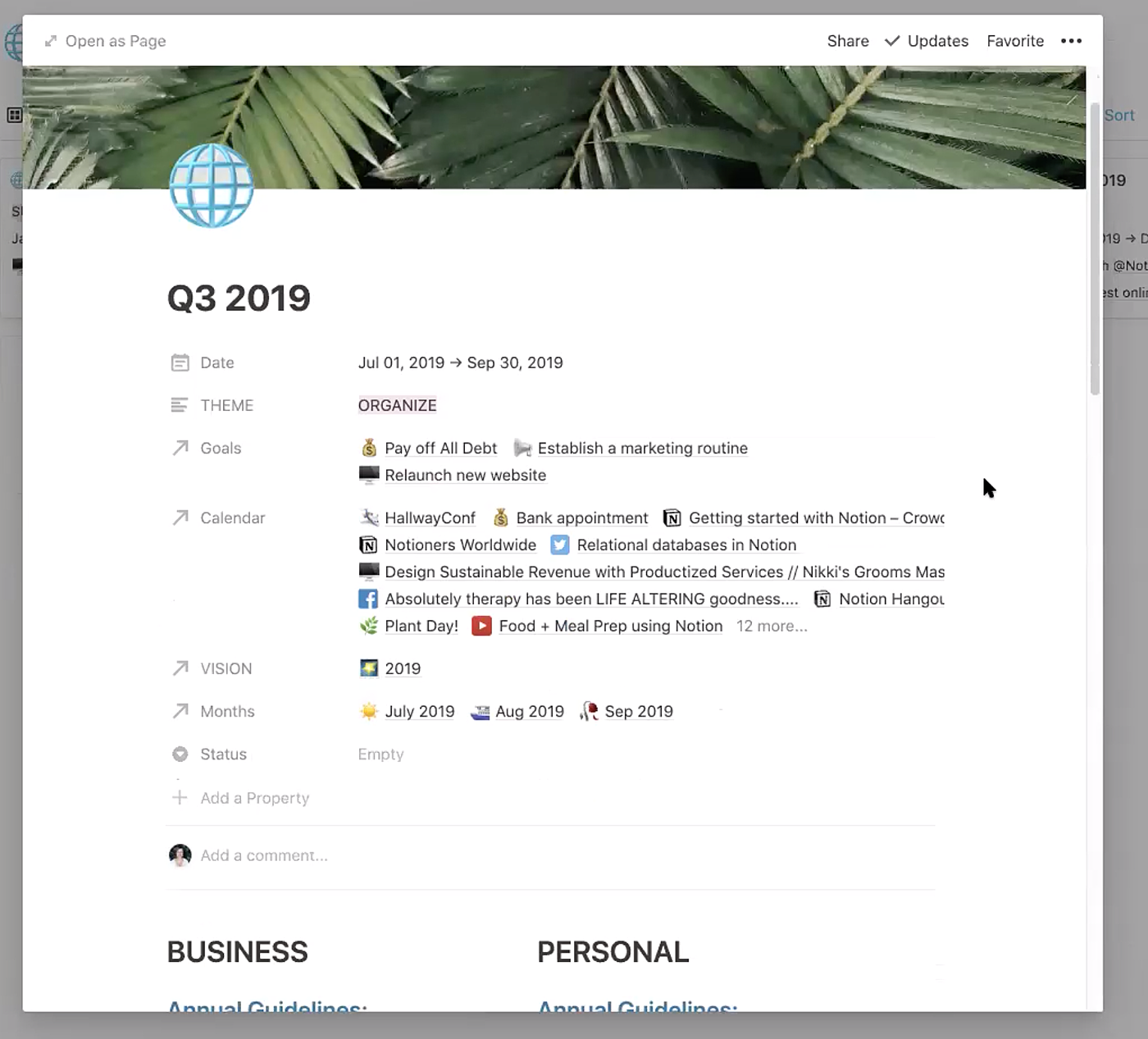
Each quarterly plan is built as a template so that I can easily make a new one. And basically I’ll pick a theme, and then connect a bunch of things up to it: goals from my goals database, events in my calendar database, my vision, and my monthly plans.
Notion makes this process easier because I don’t have to reinvent the wheel every time.
So just like with my Journal, I can also access my quarterly goals from a few different pages. As you saw earlier, I look at them from my Marie HQ page every day.
But I also have a Planning page where I collect all of my planning documents and todo lists for different timeframes. My Planning page includes everything from my Vision to my Quarterly goals, to my todo list.
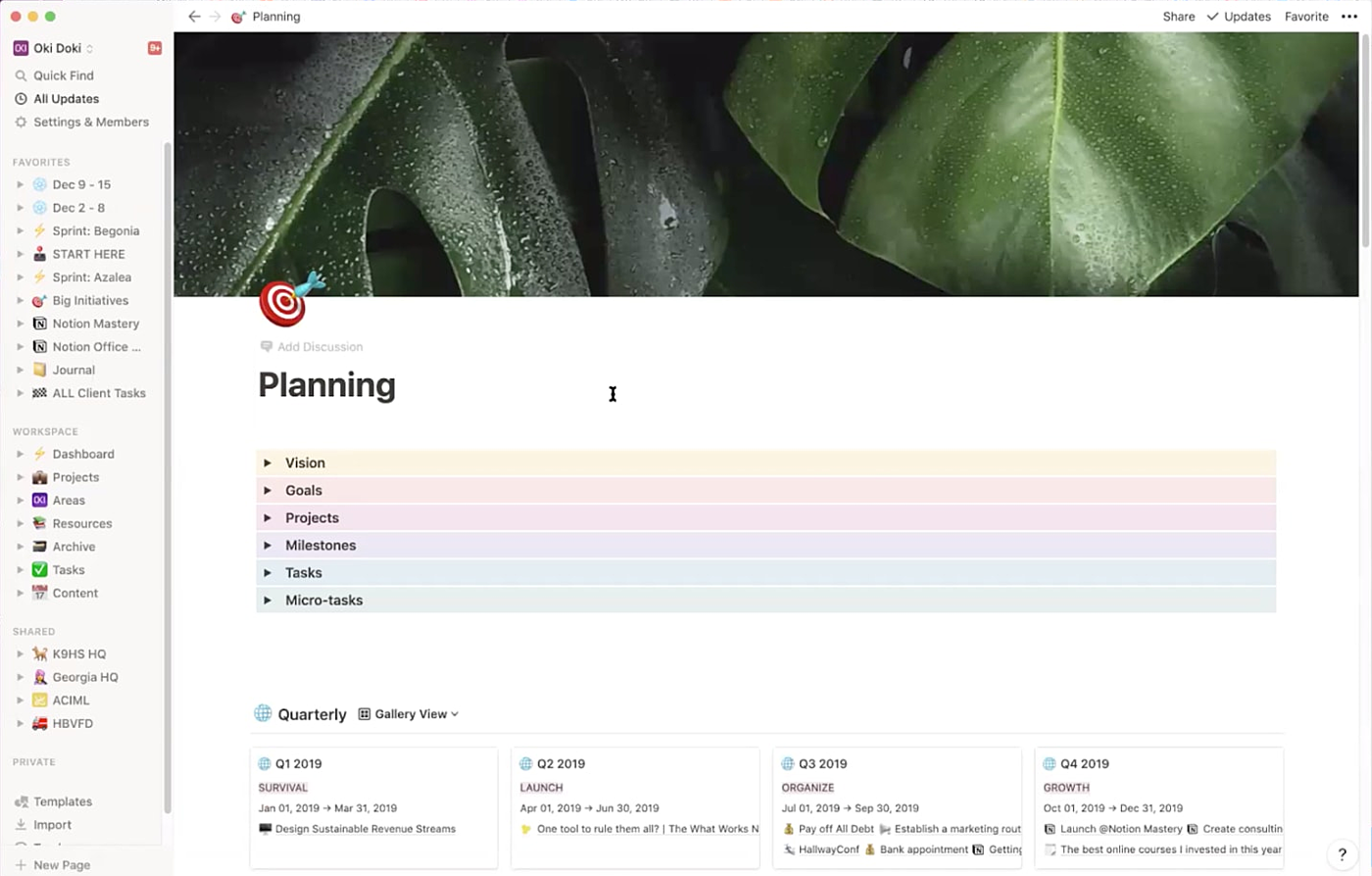
This lets me very quickly jump into each quarter and see what my goals were, what my vision statement was, what all of my projects were etc.
So if I expand the Vision toggle it lets me really easily see all of the vision statements I’ve written for each year, and then click into the one I want:

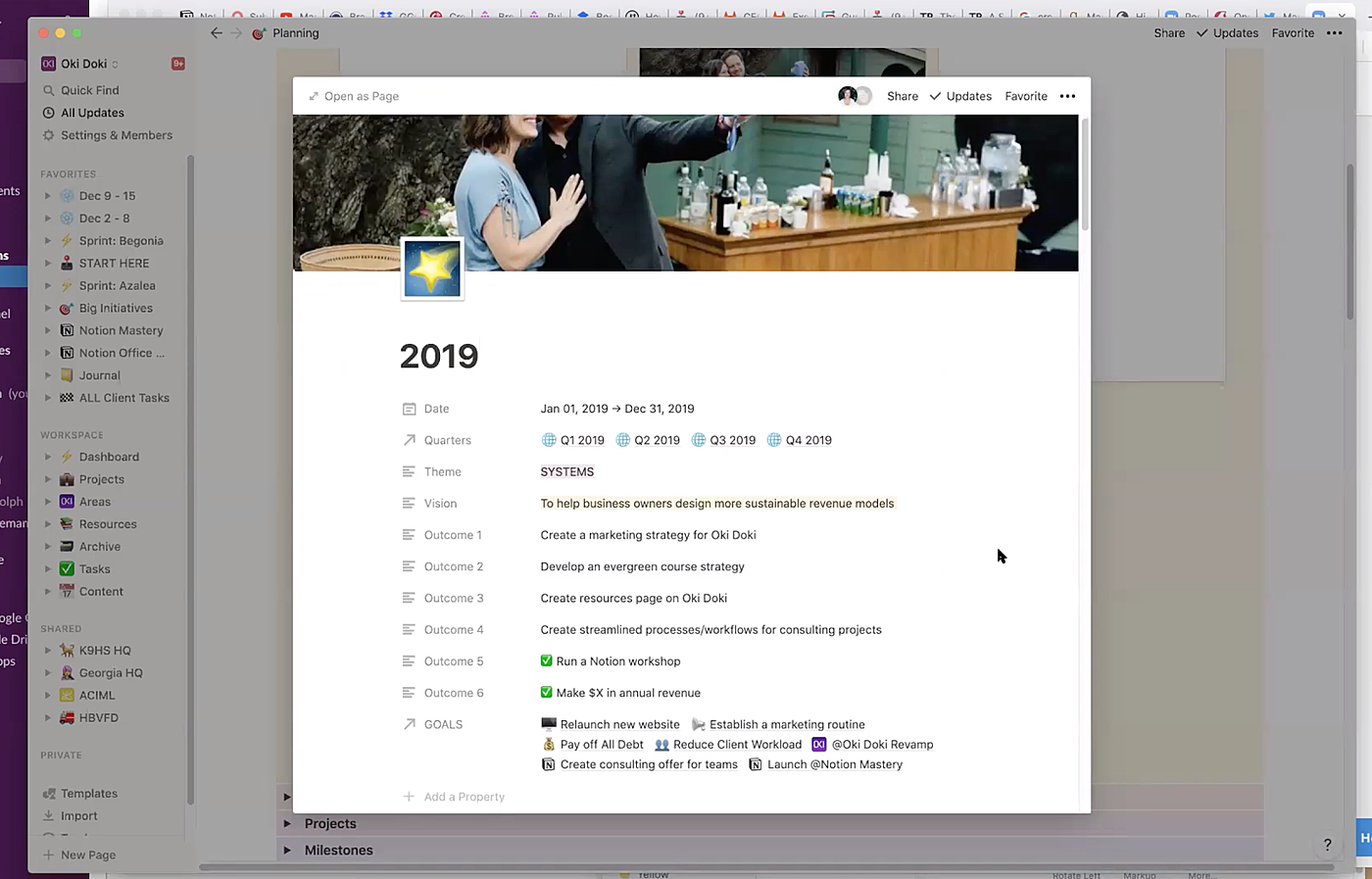
From here I can very quickly jump into each quarter and see what all the bigger goals were. Or if I scroll down I can go and look at all of the projects I worked on for that year.
As you can see, Notion makes sure everything gets tucked together and neatly organized. It’s easy to jump around from piece of information to piece of information, but still keep it in a nice tidy area.
She also uses Notion to keep track of the things she learns
I organize a lot of my Notion using PARA from Tiago Forte. I keep track of everything I’m learning — from my reading notes, to notes from courses, and inspiration and ideas within my Resources section.
If I click into my Studies + Learning dashboard, it has a list of everything that I’ve studied — even going back to university.
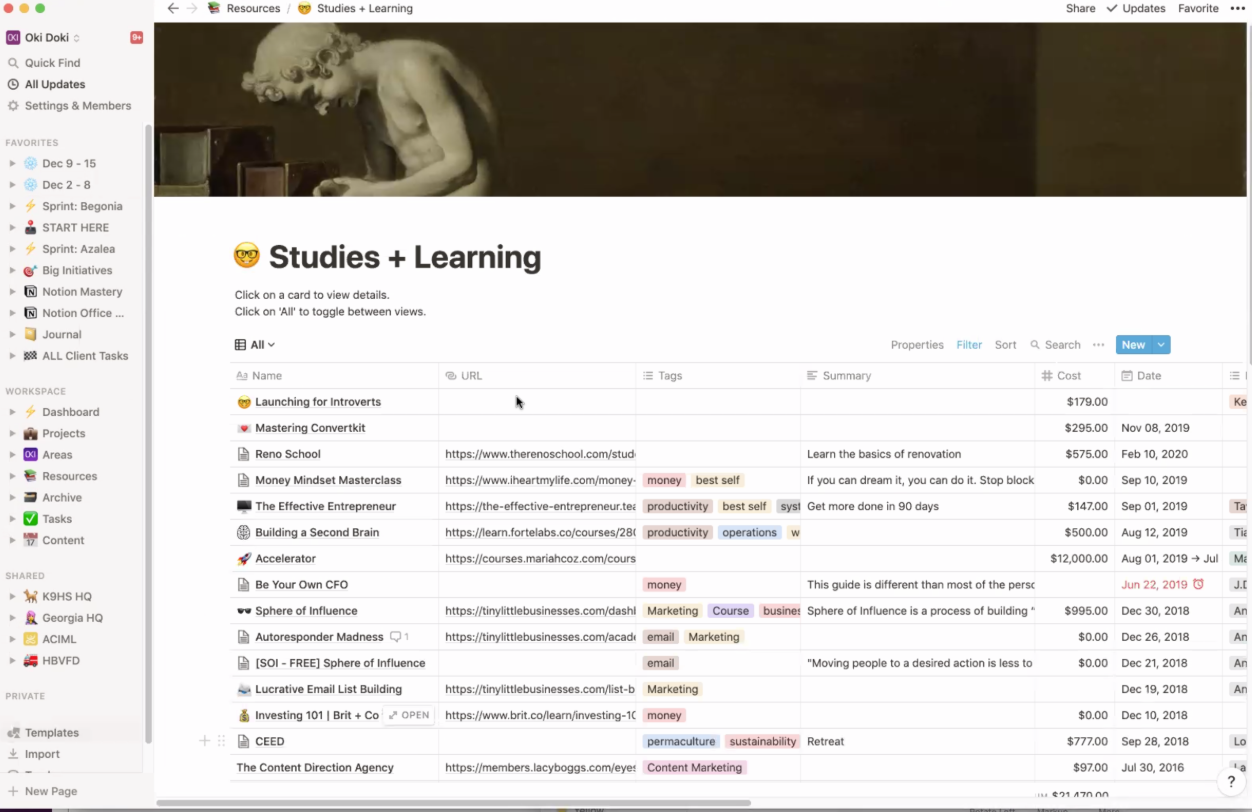
I include the amount I paid for the course, the topic, and a summary of what it was. And link it up to other sections of my Notion that are relevant like my Journal.
So for example, if I click into my notes for Tiago’s Building a Second Brain course I’ll see all of that information collected, and I have a space at the bottom where I can throw my long-form notes. That part gets a little messy — but the point is to capture all of the information I think is going to be relevant and then, over time, I can improve it.

The primary thing I’m trying to achieve here is to have a place where it all lives, and I know where to find everything.
I do the same type of thing for my Notes database. Every time I read a book or an article that seems important I’ll try to summarize it in here.
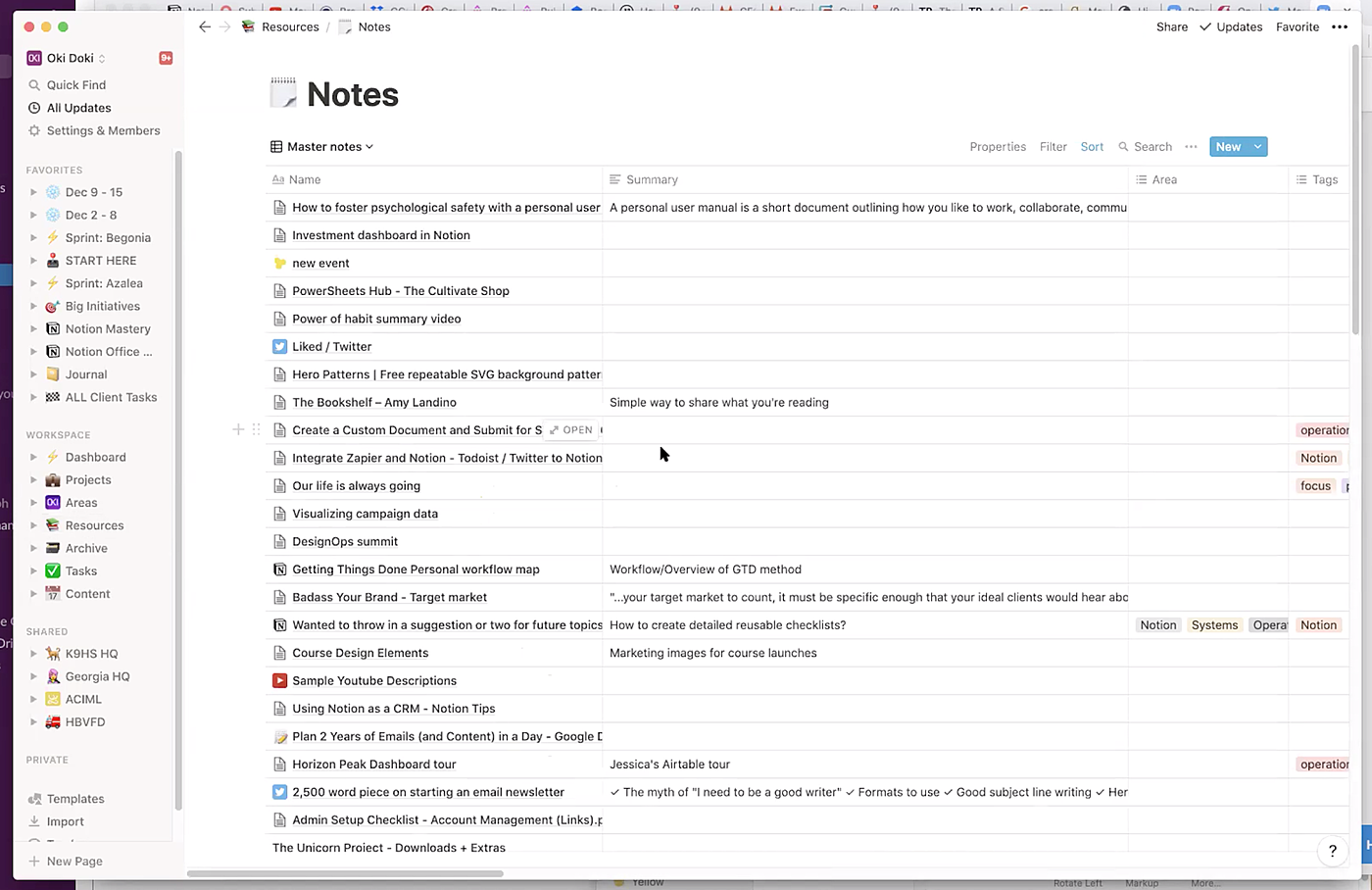
For each one I try to write a little summary, and then I’ll also use Tiago’s progressive summarization technique to bold and highlight parts of the note so that I can surface them more easily later.
So for example you’ll see for the article Better by Merlin Mann I wrote a little summary of it at the top of the note. Then I actually clipped the entire article text into the bottom, and went through to bold and highlight pieces of the article that seemed important.
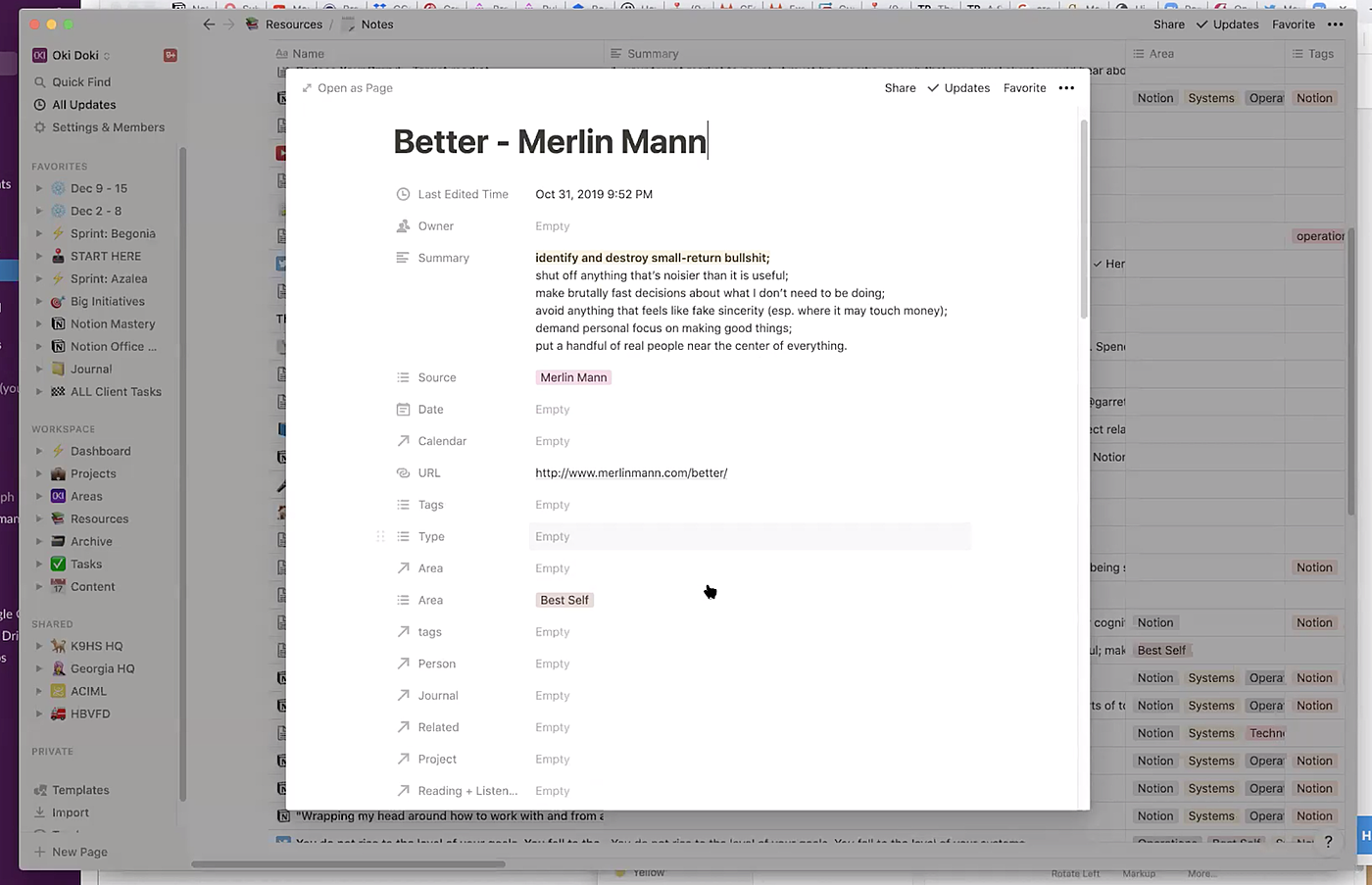
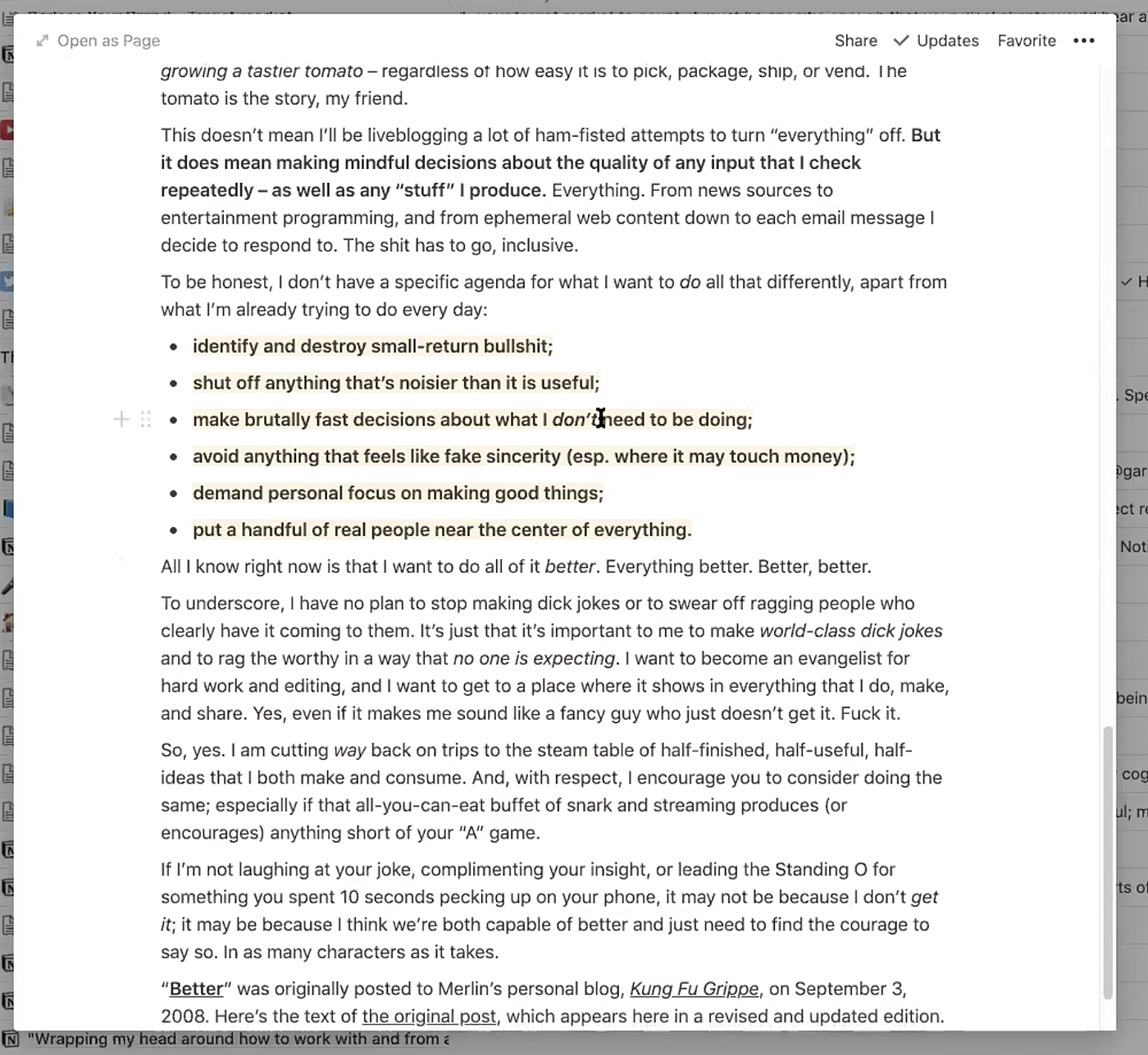
Collecting my notes in this way allows me to see what I’m learning over time, and what’s interesting.
It also helps me connect ideas to each other, because I can connect this note to a bunch of other notes. Some notes have like 50 connections and some have only 1-2.
That it gives me a really interesting view into what I’m paying attention to and what’s growing in my mind.
Notion vs. Evernote
It’s probably easy to see from this interview, but Notion is so much better suited for this than Evernote because my data doesn’t have to live in one place and I can one-click jump to the thing that I need.
This is really important because it helps make everything you’re putting in your Notion really visible for you when you need it.
Evernote feels like this digital filing cabinet where you throw things into and you never find them again. It’s like a black hole.
But when you’re using Notion you can link everything together in a bunch of different ways, and make different views to see the same data in different contexts. It’s very powerful.
She keeps up with this system and never gets tired of it
I know it might seem like a lot but I’ve never had trouble keeping up with this. This has become such an entrenched habit that it's part of my routine.
There was one time in the spring where I was visiting my family and Notion was not fully a habit yet. So I didn’t track everything in my journal and my weekly agenda. The only other time is when there are just too many meetings and client obligations that I’m pooped by the end of the day. That's pretty rare though.
For years, I tried to keep a journaling habit and it never worked. For me, Notion was the only thing that worked because I made it fun and easy. At a minimum, if I can just create my journal entry and fill out what happened today — even if it’s just a few bullet points — I’ve been able to keep up with that.
I get pure joy from doing it all the time. I also don't beat myself up too much if I don’t summarize all my notes or read the article I said I wanted to read. In the end, the fact that I can see all these interesting things: my emotions, happiness, gratitude, reading list, and so much more. I find that fascinating and very motivating.
A book recommendation

I found the book Boundaries to be so helpful. It’s really important to be able to say no, and this book helped me see that. It’s not being mean to say no. It helped me reframe and get more specific about what matters to me. It was super helpful for me personally.
Do you want to get the templates from this post and more? You should consider becoming a Superorganizers Premium member
Everything you get from a Superorganizers Premium membership:
We’re striving to make Superorganizers Premium everything you need to live a productive life — for just $15 / month.
When you become a member you’ll get:
If you care about productivity, this is the membership you need. Subscribe below.
Jake Leffew was a contributing writer on this piece.
The Only Subscription
You Need to
Stay at the
Edge of AI
The essential toolkit for those shaping the future

"This might be the best value you
can get from an AI subscription."
- Jay S.
 Every Content
 AI&I Podcast
 Monologue
 Cora
Cora
 Sparkle
 Spiral
Join 100,000+ leaders, builders, and innovators

Email address

Already have an account? Sign in
What is included in a subscription?
Daily insights from AI pioneers + early access to powerful AI tools

 Front-row access to the future of AI
 In-depth reviews of new models on release day
Playbooks and guides for putting AI to work
Prompts and use cases for builders
In-depth reviews of new models on release day
Playbooks and guides for putting AI to work
Prompts and use cases for builders
In-depth reviews of new models on release day
Playbooks and guides for putting AI to work
Prompts and use cases for builders
In-depth reviews of new models on release day
Playbooks and guides for putting AI to work
Prompts and use cases for builders
 Bundle of AI software




 Scott Nover



 Evan Armstrong
 Dan Shipper
 Reviews of new AI models on release day
Comments
Don't have an account? Sign up!