





Happening now: We’re hosting Vibe Code Camp with the world’s best experts pushing the limits of what’s possible. Watch live now until 6 p.m. ET, and catch the recordings. Also: This article is based on a sponsored event. Cursor provided $100 in credits to attendees and made this camp possible.—Kate Lee
A few minutes into Every’s first Cursor Camp, Cursor developer education lead Lee Robinson made a bold declaration: “The IDE is kind of dead.”
IIDE stands for “integrated development environment”—basically Microsoft Word, but for code. It’s where programmers type, organize files, and run programs, and for decades, it has been the center of a programmer’s world.
Now, that model is breaking down. The center of gravity has shifted from typing code by hand in an IDE such as Visual Studio Code to managing AI agents that write it for you with a tool such as Cursor.
In this session, Lee and Samantha Whitmore, a software engineer at Cursor, walked us through how they work in a post-IDE world. What follows are the workflows, model-selection strategies, and honest limitations they shared—plus where this leaves you if you’re trying to figure out what the future of code looks like.
Key takeaways
- The agent is becoming the core. Writing and editing code by hand is shrinking as a percentage of the work. Developers are now spending more time telling AI agents what to build and reviewing their output.
- Cloud and local agents are merging. You’ll soon be able to start an agent on your computer, hand it off to remote servers when you close your laptop, and pick it back up later—no context lost.
- Model choice matters more than prompting tricks. Prompting gimmicks like, “I’ll pay you $1,000,” which some AI users swore could make AI provide a better output, don’t work anymore. You need to choose the right model for the job—say, one for brainstorming, another for deep bug-hunting.
- Agents can run for weeks. Cursor’s research team built a working web browser from scratch using AI agents that ran for days, producing 3 million lines of code. It cost $80,000 in tokens (the units AI companies use to measure and charge for usage). It’s a research project that’s not available for public use—for now. But it shows where things are heading.

Move fast, don’t break things
Most AI coding tools don’t know which line of code will actually break your system. Try Augment Code, which understands your entire codebase, including the repos, languages, and dependencies that actually runs your business, and use their playbook to learn more about their framework, checklists, and assessments. Ship 30% faster with 40% shorter merge times.
What ‘the death of the IDE’ means
Cursor looks like a traditional coding tool on the surface. There are files on the left, code in the middle, and now an AI chat panel on the side, where you can ask the agent to do things.
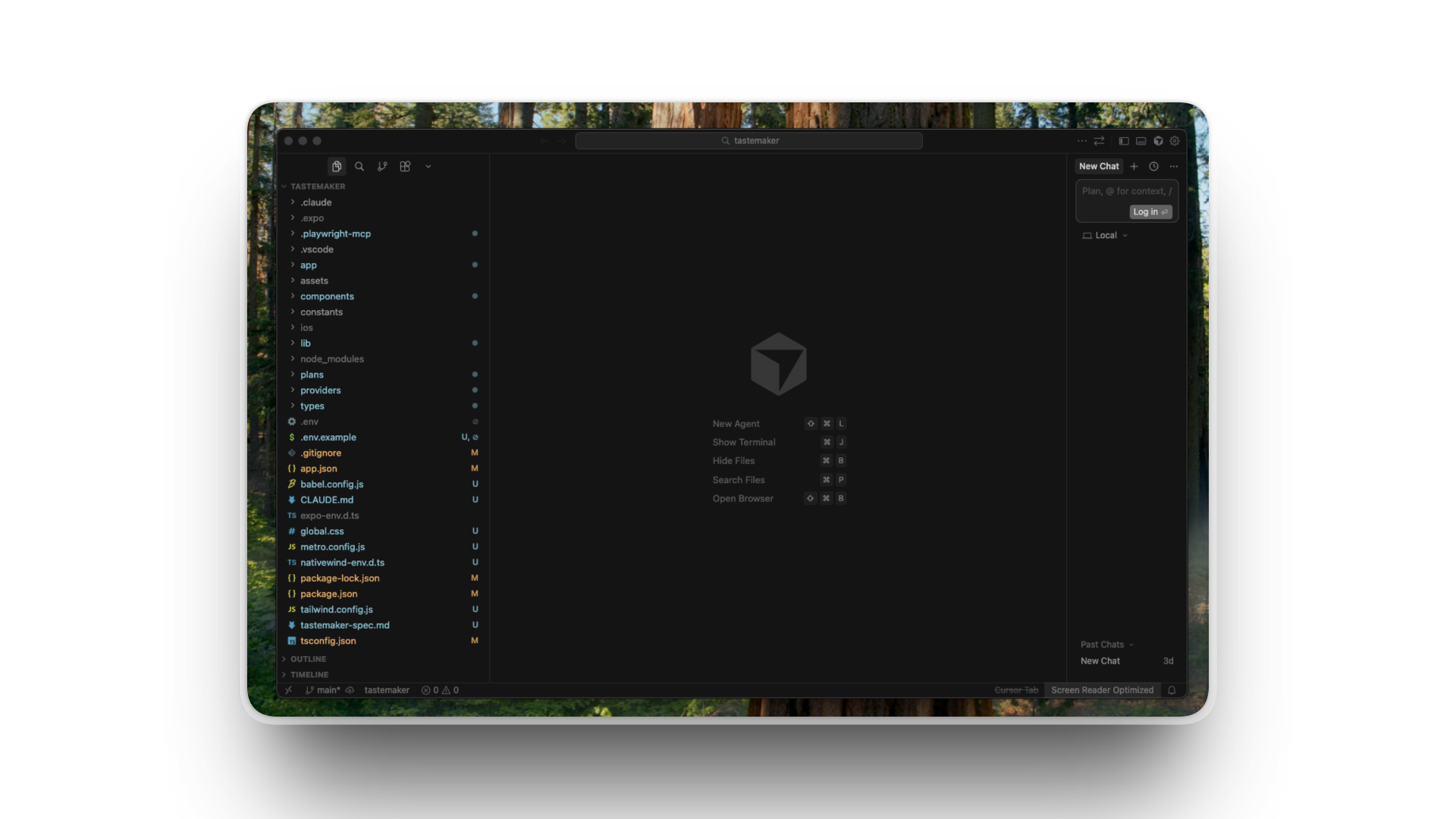
For many Cursor users, that chat panel has become the main event. Some don’t even look at the code output much—they work entirely in conversation with the AI, only reviewing the final result.
According to Lee, developers used to interact with Cursor primarily by writing code by hand and using an autocomplete function, where the AI suggests the next line of code as you type, similar to predictive text on your phone. But Lee says recent Cursor’s usage data tells a different story: More and more developers are working inside the agent interface. He said that writing code by hand may comprise as little as 10 percent of the time for some developers.
This is why he believes that easier text editing—for which Cursor and tools like it were originally built—is less important than the coding agent—which writes and edits code—and the ability to review the agent’s output and track changes.
And with new tools and integrations being built every day (like Every’s compound engineering plugin), it seems likely the old ways of AI-enabled coding will slip farther down the ranking.
A browser built from scratch by AI (for $80,000)
When you use an AI coding tool, you’re really using two things: the model (the AI brain that generates code) and the scaffolding known as the harness around it (the infrastructure that lets that brain do things—run commands, edit files, handle errors, and manage context). The model comes from OpenAI or Anthropic. The harness is what Cursor builds.
The same model can perform very differently depending on its harness. A well-tuned harness knows how to feed the model the right context, when to truncate long outputs, how to recover from errors, and how to keep the AI on track during long tasks.
To stress-test what a well-tuned harness could do, Cursor’s team built a custom research harness around GPT 5.2 and set it loose on an absurd task: building a fully functional web browser from scratch. AI produced 3 million lines of code across thousands of files, generated over weeks of continuous running, at a cost of around $80,000 in tokens. The browser that resulted could render web pages, handle Flexbox (a layout system for web design), display images, and run scripts.
At $80,000, this is a hefty research project, not something your average solo developer could try on a Tuesday afternoon. But a year ago, the same task would have been impossible at any price. If costs continue to come down, “Let the agent run for a week on something ambitious” might feel less like a stunt in time.
How a Cursor coder uses Cursor
Cursor’s team uses Cursor to build Cursor. Their workflows are both a window into power-user techniques and a preview of where the tool is headed because the features they find themselves wanting tend to become the features they build.
Sam showed how she’s building features for Cursor’s cloud agents product, including the ability to move an agent from your local computer to the cloud—in other words, a remote server—and back.
Right now, if you start an AI agent on your laptop and then close it for lunch, the agent stops. Sam’s project would let you hand the agent off to run in the cloud, check on its progress from your phone, and have it back your computer when you’re ready.
Planning comes first
Before Sam writes any code, she spends serious time in “plan mode,” a Cursor feature where you talk to the AI about what you want to build before it starts building. For complex projects, she’ll share designs and screenshots, and have a long conversation to create a detailed plan.
The more detailed your upfront plan, the less the AI wanders off into expensive tangents. “Plan mode“—whether in Cursor, Claude Code, or any other tool—has become gospel among top AI-powered coders.
For large plans, Sam uses multiple agents working in parallel, manually breaking the work into pieces. For small-to-medium plans, she might use one or two agents. For simple bug fixes, she sometimes skips planning entirely.
Model selection is based on vibes
Sam has developed what she calls “personal vibe assessments” for different AI models, rough heuristics for when to use which model:
- Claude Opus: This is Sam’s brainstorming buddy. It’s good at connecting dots and helping when something is poorly specified, plus it can zoom out and correct itself.
- GPT 5.2 Codex High: Sam says Codex has “robotic energy.” It takes you at your exact word. It’s also incredibly thorough for bug-finding, but it can get fixated on one approach instead of stepping back to try something different.
Sometimes she uses both at once, running the same task through multiple models in parallel and comparing the results. Cursor has a feature called “best of n” that lets you run up to eight models simultaneously on the same problem. Sometimes, if a bug is tricky to fix, Sam will have Codex and Opus go head-to-head to see which model’s approach comes out on top.
When multiple models return different answers, she interviews them. She’ll ask one model to justify its approach, then share that reasoning with another model and ask what it thinks. It’s a bit manual, but it helps her understand the problem deeply before deciding what to do.
Review is part of the workflow
Cursor has built-in review tools. There’s a “find issues” button that kicks off another agent to review the code from a fresh perspective. They also have a tool called Bugbot that automatically reviews GitHub pull requests (the drafts developers submit before code goes live) and flags likely bugs.
Sam said Cursor has an internal policy: Don’t merge code until you’ve addressed all Bugbot comments.
Retrieval over compression
Sam has shifted her thinking in one more way recently. She used to think you needed to compress conversations into summaries for AI to remember past work. Now she prefers a “retrieval first” approach: Instead of summaries, she gives the AI pointers to past conversations and plan documents and lets it explore them as needed.
“The agents have gotten so good at exploring pointers to files,” she said.
Q&A highlights
Q: Where is the early access channel for new features?
In Cursor settings under “beta,” you can choose between stable, early access, and nightly releases. Lee recommended early access for people who want to try new features without dealing with frequent bugs or crashes.
Q: How does Cursor handle context as agents run longer?
Cursor now uses a “pointer” system. Instead of stuffing the AI’s memory with full documents, it gives the agent pointers to files and lets it explore them as needed. This prevents the AI from getting confused by too much information at once.
“The models are smart enough now to go explore it and use file read tools and grep tools to explore this context as it needs,” Sam said. Grep refers to a command to search for and find matching text patterns in files.
Q: Do prompting tricks like “I’ll pay you $1,000” still work?
No. The Cursor team said steering the model with rewards or threats has become less important than managing context pollution (preventing the AI from being overwhelmed with irrelevant information). The models are already well-trained for coding tasks—the trick is staying out of their way.
Q: I do simple websites from Figma designs. I can’t get agents to match the design faster than doing it myself.
Sam said this is tricky for companies like Cursor. The Figma integration is built by Figma, not the AI companies, so the models haven’t been trained on how to use it. You’ll likely need to experiment more with your prompts to get good results.
For straightforward design-to-code translation—taking a static design and turning it into working code, the bread and butter of many web developers—AI tools still don’t reliably beat human speed. The gains seem concentrated in more complex, multi-step tasks where the AI can run longer and handle more scope.
Questions to ask before switching
As someone without a software engineering background but who vibe codes frequently, here’s what I came away from this camp thinking: Cursor’s vision is compelling—agents that run for weeks, seamlessly move between your laptop and the cloud, and handle projects that would take human developers months. But the gap between the demo and daily reality is worth examining.
A few things stood out:
The cost barrier is real—for now. Sam admitted she “literally never looks at” token usage, relying on the $200-per-month unlimited plan. For people doing simpler tasks or with smaller budgets, the calculus might be different.
Design translation remains hard. The question about Figma-to-code workflows didn’t get a satisfying answer. If you’re a web developer doing straightforward implementation work, these tools may not save you time yet.
Model selection is becoming its own expertise. Knowing when to use Opus versus Codex, run multiple models in parallel, and interview the AI about its choices, among other things, is emerging as its own skill set.
That shift has implications beyond professional developers. If agents can build browsers from scratch, what else becomes possible for people who’ve never written a line of code?
The answer, based on what I saw: complex, multi-step projects where you can describe what you want and review what you get. The simpler the task—the more it’s about matching a specific design or writing a single function—the less these tools help.
Whether the IDE is “dead” or evolving, one thing is clear: The teams building these tools have huge amounts of influence on the direction AI-powered coding is headed. It’s good to know what they’re building—and to test their claims against your own experience.
Want more hands-on training with AI tools? Join us for our next camp. Subscribe to Every and keep an eye on your inbox.
Katie Parrott is a staff writer and AI editorial lead at Every. You can read more of her work in her newsletter.
To read more essays like this, subscribe to Every, and follow us on X at @every and on LinkedIn.
We build AI tools for readers like you. Write brilliantly with Spiral. Organize files automatically with Sparkle. Deliver yourself from email with Cora. Dictate effortlessly with Monologue.
We also do AI training, adoption, and innovation for companies. Work with us to bring AI into your organization.
Get paid for sharing Every with your friends. Join our referral program.
Help us scale the only subscription you need to stay at the edge of AI. Explore open roles at Every.
The Only Subscription
You Need to
Stay at the
Edge of AI
The essential toolkit for those shaping the future

"This might be the best value you
can get from an AI subscription."
- Jay S.
 Every Content
 AI&I Podcast
 Monologue
 Cora
Cora
 Sparkle
 Spiral
Join 100,000+ leaders, builders, and innovators

Email address

Already have an account? Sign in
What is included in a subscription?
Daily insights from AI pioneers + early access to powerful AI tools





 Front-row access to the future of AI
 In-depth reviews of new models on release day
Playbooks and guides for putting AI to work
Prompts and use cases for builders
In-depth reviews of new models on release day
Playbooks and guides for putting AI to work
Prompts and use cases for builders
In-depth reviews of new models on release day
Playbooks and guides for putting AI to work
Prompts and use cases for builders
In-depth reviews of new models on release day
Playbooks and guides for putting AI to work
Prompts and use cases for builders
 Bundle of AI software




.12.16_PM.png)
 Rhea Purohit

 Naveen Naidu

 Katie Parrott
 Reviews of new AI models on release day
Comments
Don't have an account? Sign up!