




Sponsored By: Tool Finder
This essay is brought to you by Tool Finder, the one-stop online resource to find the best productivity tools out there. Stay ahead of the curve with our selection of the hottest productivity tools each month.
Here are a few one-line emails I have received in my time:
“Omg. Can I call u now? I'm soooooooo proud of you and happy for u. Xoxoxoxoxox.”—my mom when I sent her the TechCrunch story covering the sale of my first startup.
“Congrats!”—my investors replying to my long, detailed Every updates even when I’m sharing bad news. (Love y’all, seriously.)
“Where’d you get this email?”—an author I admire after I guessed their email and sent a glowing missive about how they had impacted and inspired me.
These are funny, but I actually think the one-line email is one of the greatest productivity hacks ever conceived. I first observed this in my dad who sends rapid-fire emails just by filling out the subject line, and I see this sort of behavior in productive emailers of all stripes.
It is an art to respond to a long email with a single sentence. A one-line email says something about its sender:
- You are confident
- You are in command
- You do not, psychologically speaking, give too many fucks
I am not like this. I have many fucks to give, I guess. I once tried to read Mark Manson’s artful work on this topic, but it was perhaps too subtle for me.
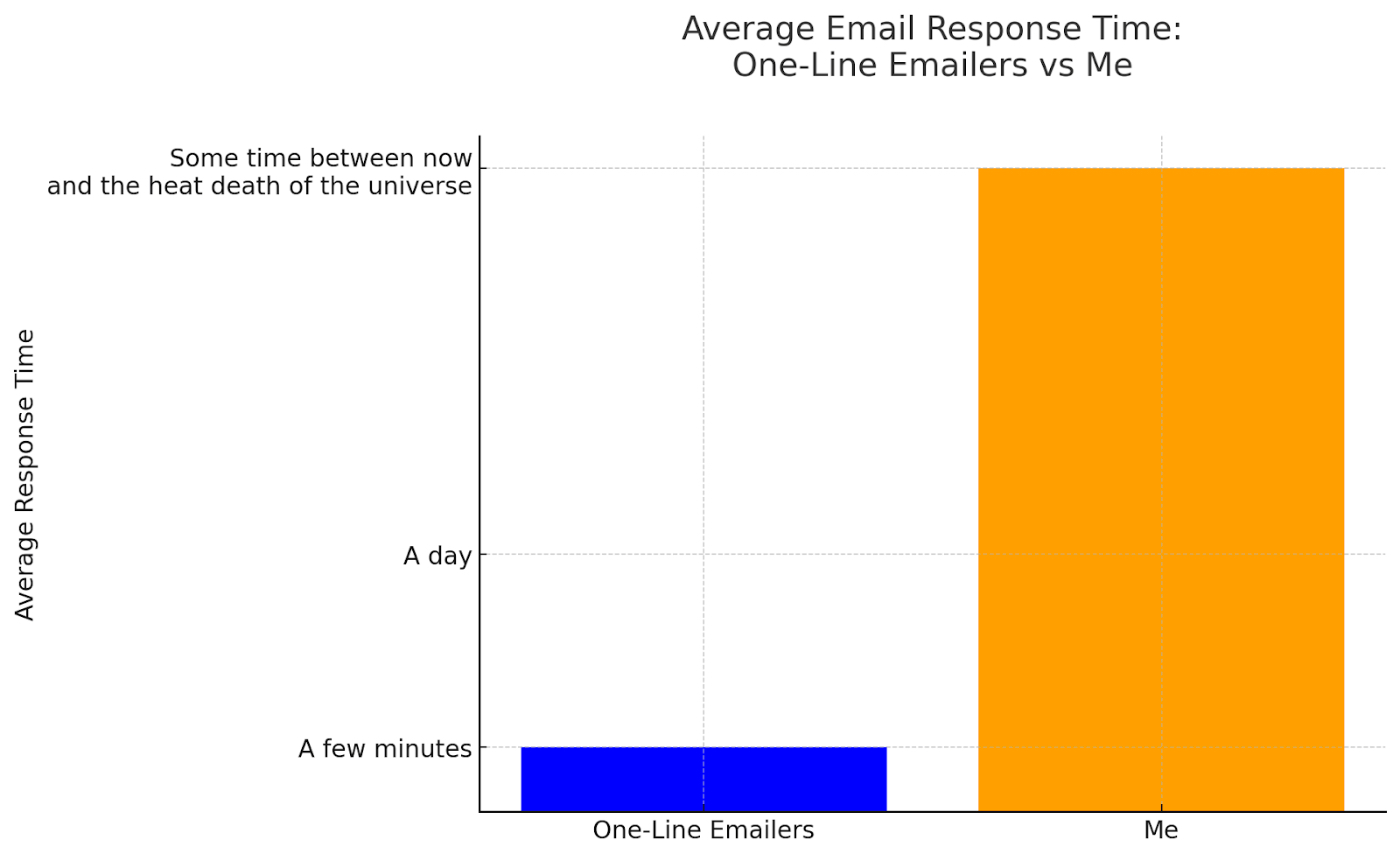
When I send an email I don’t want to come off as rude or arrogant, so I overwrite. I use lots of exclamation points and smiley faces so that no one can get mad at me. I consider carefully everything I say, and I make sure to cover every corner case when I reply.
This results in famously inconsistent email response times as compared to one-line emailers:
I’ve tried a lot of different things to improve upon this. I’ve tried one-touch email strategies (ineffective for reasons outlined above.) I’ve tried endlessly haranguing myself over and over again in my mind (satisfying, but ineffective.) I’ve even tried using the power of social pressure by having my VA, Taylor, act as my email babysitter (more effective, but also embarrassing for a grown adult.)
Given this sorry state of affairs, I’ve been hoping our new AI overlords would finally come to solve my email productivity problems. Google’s been making some rumblings in this area. Outlook too. But all of these are limited previews, and I haven’t seen anyone seriously attempt a production-level version of this yet.
Enter Superhuman. Last week, they let me into their AI beta. They’ve built a suite of AI tools that can help you draft replies, summarize long email threads, and more. All with Superhuman’s flow-friendly keyboard shortcuts.
I’ve been a happy Superhuman subscriber since they were Silicon Valley’s hottest invite-only club, and I’ve been waiting for them to do something like this for a while. I even interviewed their Head of Product Growth, Gaurav, back in the day about how he does his email. So I was very excited to check this new release out.
I’ve been using the beta for about a week now, so I have enough experience to do a write-up. The question is: does Superhuman transform me into the one-line email machine of my dreams?
Superhuman’s new AI features
If I had to sum up Superhuman’s current approach to AI it’s something like the way the patriarch of a patrician family in 19th century Vienna probably thought of his kids:
“They are messy and chaotic but they are also the future. So they should be totally invisible unless I snap my fingers. And when I do snap my fingers they should perform tricks that do a minimum amount of damage until I’m tired of them, in which case they should become invisible again.”
Given how hard it is to make AI actually useful in a production-level app and how chaotic its current output can be, I think this is the exact right attitude for Superhuman to take. They’ve added AI, yes. But it’s not going to get in the way unless you really want to use it. And when you do use it, it’s not going to make a mess.
Superhuman has done this by making AI available through a keyboard shortcut (Cmd + J) and a little unobtrusive button at the bottom of their compose UI:

- Write emails—This lets you write one line (or a few) about what you want your email to say, and Superhuman will turn it into a fully-written email.
- Polish emails —This will take something the AI wrote and rewrite it in your voice (cool!), or otherwise improve it by simplifying, shortening, lengthening, or clarifying it.
- Summarize emails—This will take a long chain of emails and turn who said what into a list of bullet points that are easily scannable.
- Chat with the AI— This lets you talk to the AI like you would ChatGPT, which is useful for little things here and there.
 Create a free account to continue reading
The Only Subscription
You Need to
Stay at the
Edge of AI
The essential toolkit for those shaping the future

"This might be the best value you
can get from an AI subscription."
- Jay S.
 Every Content
 AI&I Podcast
 Monologue
 Cora
Cora
 Sparkle
 Spiral
Join 100,000+ leaders, builders, and innovators

Email address

Already have an account? Sign in
What is included in a subscription?
Daily insights from AI pioneers + early access to powerful AI tools

 Front-row access to the future of AI
 In-depth reviews of new models on release day
Playbooks and guides for putting AI to work
Prompts and use cases for builders
In-depth reviews of new models on release day
Playbooks and guides for putting AI to work
Prompts and use cases for builders
In-depth reviews of new models on release day
Playbooks and guides for putting AI to work
Prompts and use cases for builders
In-depth reviews of new models on release day
Playbooks and guides for putting AI to work
Prompts and use cases for builders
 Bundle of AI software




 Dan Shipper

.png)

 Evan Armstrong
 Reviews of new AI models on release day
Comments
Don't have an account? Sign up!